Quick Start Guide

Welcome to your Daily Ring

Seven simple steps to set up your iTasbeeh Daily Ring — count your dhikr, get gentle prayer reminders, and send Salam to the ones you love. Dhikr, made simple.

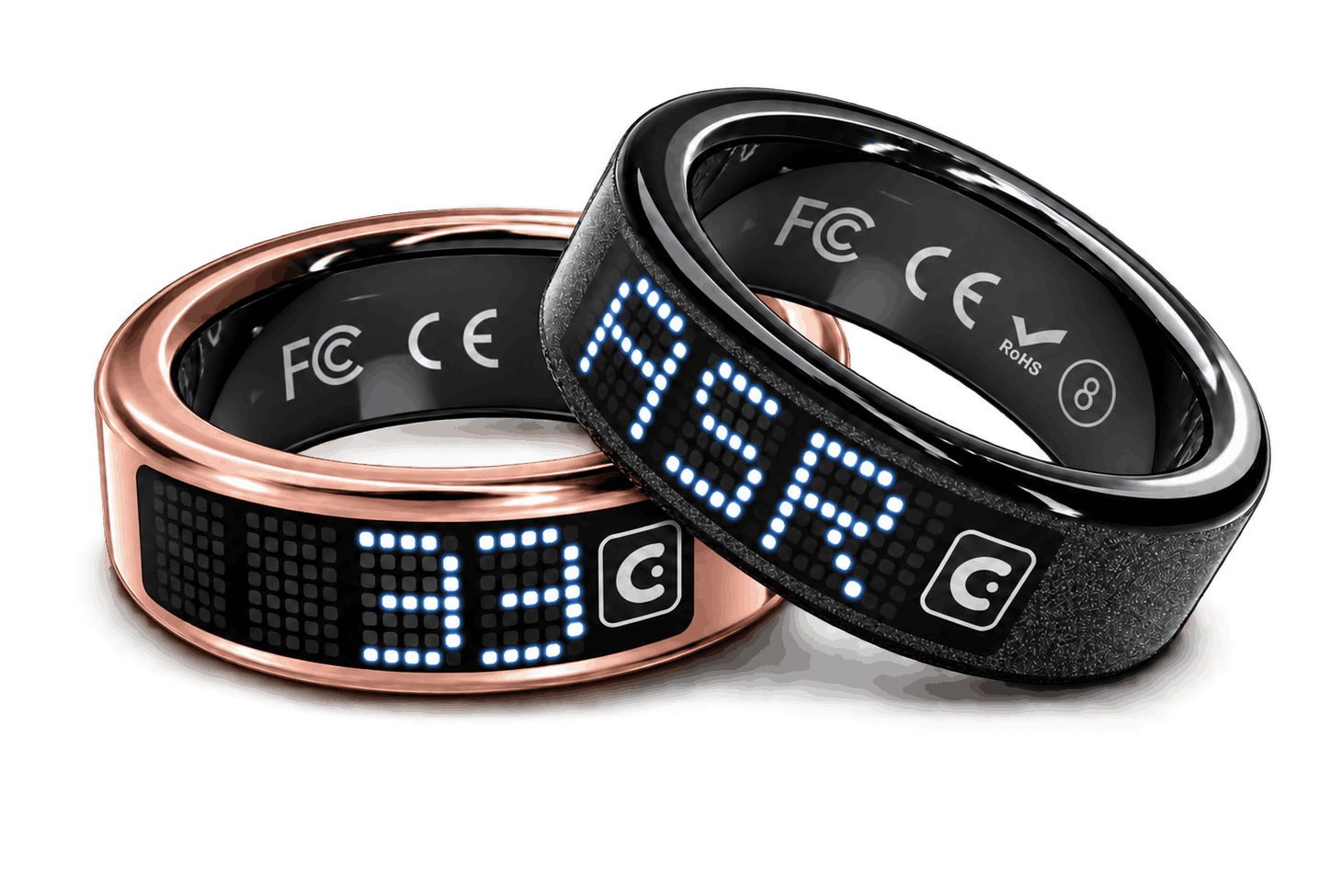
iTasbeeh Daily Ring in rose gold and black
01 Unbox

Open the box, meet your Daily Ring.

Lay out everything inside your Daily Ring box. It’s a simple, focused set — your ring, a magnetic charging cable and a Quick Start Guide. Your ring comes in black or rose gold.

  • 1 × Daily Ring Black or rose gold, with a four-character dot-matrix display
  • 1 × Magnetic Charging Cable Charges your ring directly
  • 1 × Quick Start Guide A printed guide to get you started
1 × Daily Ring
Black · Rose Gold
1 × Magnetic Charging Cable
Charges your ring directly
1 × Quick Start Guide
Printed guide
02 Charge

Attach the cable, let it sip energy.

Charge your Daily Ring with the included magnetic cable — charging also activates it, so charge to 80% or more before pairing. Connect the cable’s other end to a USB power source, then bring the magnetic end to the ring’s charging contacts.

  • Attach the magnetic cable Bring the magnetic end of the cable to the ring’s charging contacts and let it hold in place. Connect the other end to a USB power source.
  • Keep contacts clean and dry Dry the ring’s charging contacts before charging and never short-circuit them. Use only the magnetic cable included in the box.
  • Up to 5 days per charge A single charge lasts up to 5 days, depending on settings and use — including display use, vibration frequency and Bluetooth connection.
03 Download App

Get the iTasbeeh Salam app.

Download the iTasbeeh Salam app from the buttons below. It sets up your ring and prayer reminders, syncs your dhikr count automatically, and lets you choose who receives your Salam Touch blessings.

iTasbeeh Salam app on the App Store and Google Play
04 Pair Ring

Connect your ring to the app.

Once your ring is charged to 80% or more, pairing only takes a moment. Your Daily Ring connects to your phone over Bluetooth.

  • Wake the ring & enable Bluetooth Press and hold the touch button for 2 seconds to wake the ring — the time appears on the display. Then turn on Bluetooth and allow the app’s Bluetooth permission.
  • Open the app & sign in Create your iTasbeeh account with email, Apple ID, or Google. It only takes seconds.
  • Tap "Add Device" Keep the ring close to your phone and select the device shown in the app to pair.
  • Location & prayer times are set for you Allow location access when asked, and the app sets your location and prayer calculation method automatically. Change them manually only if you want to.
Pairing…
Daily Ring
Searching…
Connect
05 Start Dhikr

A single touch, a deeper presence.

Wear the ring on any finger — many people prefer the index. Your Daily Ring has one touch button: short-press it with your thumb to count, and watch the number appear on the four-character dot-matrix display.

  • Hold 2 seconds to wake Press and hold the touch button for 2 seconds to wake the display and see the time.
  • Short press to count Each short press adds one to your count — one tap, one dhikr. At 33, a short vibration lets you know.
  • Hold 6 seconds to start over While counting, press and hold the touch button for 6 seconds to reset the count to zero. This is on by default — you can turn it off in the app to prevent accidental resets.
  • Your count stays and syncs Your count is saved even if the battery runs out, and syncs to the iTasbeeh Salam app automatically. Counts recorded before a reset are uploaded to your history through your phone.
Dhikr count
Short-press with your thumb
06 Prayer Reminders

Five prayers, five gentle reminders.

Synced with the app, your ring gives a gentle buzz at prayer time and shows which prayer it is. No sound and no interruption — just a quiet nudge on your finger.

  • Prayer times are automatic The iTasbeeh Salam app sets your prayer times from your location and calculation method automatically. Adjust them in the app only if you prefer.
  • Feel it, see it At prayer time your ring vibrates gently and lights up with the prayer name, such as FAJR, ASR or ISHA.
  • Vibration, not sound Reminders use vibration only — there are no beeps, and your ring does not play the Azan aloud.
  • Quiet while you pray Blessings that arrive during prayer time are held silently and shown to you afterwards.
Prayer time
A gentle buzz — no sound
07 Salam Touch

Tap 4 times. Send Salam.

Thinking of someone? With the screen dark, tap your Daily Ring 4 times. It vibrates once and your blessing is on its way to their ring — they feel it, see it, and can reply with 4 taps.

Before you send Salam Touch works between two Daily Rings. Both people need a ring, with their phones nearby and the iTasbeeh Salam app running in the background — no need to take out your phone or open the app. The rings never need to touch each other.
  • Choose who receives your Salam In the app, pick the people you want to bless — your family circle by default. Your ring sends Salam, switching to Ramadan Mubarak or Eid Mubarak on those occasions, or your own message. You can also send a blessing straight from the app.
  • Tap 4 times to send With the screen dark, quickly tap the ring 4 times. It vibrates once, scrolls your blessing across the display, then shows SENT. Their ring buzzes and lights up.
  • Changed your mind? Undo Long-press within 3 seconds after sending to undo it.
  • Reply with 4 taps When a blessing arrives, your ring vibrates and displays it. Tap 4 times while it is shown, or within 30 minutes, to send one back.
Your ring
Tap 4 times
Their ring
See it in action

Count. Remember. Connect.

A 60-second tour of your Daily Ring — count with a gentle touch, feel your prayer reminders, and send a blessing to the ones you love, anywhere in the world.

Good to know

Make every dhikr count.

Light for all-day wear

Just 2.75 mm thin and only 3–4 g depending on size — so light you’ll forget you’re wearing it.

Get the right fit

Daily Ring comes in US sizes 8–13, and many people wear it on the index finger. If it feels too loose or too tight, contact support before long-term use.

Your count stays safe

Your count is saved even when the battery runs out, and syncs to the app automatically. Counting happens right on the ring.

Simple magnetic charging

Charge with the included magnetic cable for up to 5 days of use. Keep the cable and the charging contacts clean and dry.

Frequently asked

Quick answers.

A new ring ships in shipping mode, so charge it first to activate it — ideally to 80% or more. Make sure the magnetic end sits firmly on the ring’s charging contacts, which should be clean and dry. After charging, press and hold the touch button for 2 seconds to wake it. If it still does not respond, try another USB power source and contact support.
Make sure the ring is charged and awake — hold the touch button for 2 seconds. Keep it close to your phone, turn on Bluetooth and allow the app permissions. If the ring was connected before, remove the old device record in the app and tap Add Device again. If it still cannot be found or seems locked to another phone, contact support with your order number or serial number.
While counting, press and hold the touch button for 6 seconds to reset the count to zero. This is on by default, and you can turn it off in the app to prevent accidental resets. Counts recorded before a reset are uploaded to your history in the app through your phone.
Most people wear it on the index finger, where the thumb can reach the touch button easily. Daily Ring comes in US sizes 8–13 — if the fit isn’t right, contact support.
You can wake the ring, check the time and count your dhikr on the ring itself. To set up prayer reminders and sync your count, pair the ring with the iTasbeeh Salam app. Salam Touch needs your phone nearby with the app running in the background — you don’t need to take it out or open the app. App download, sign-in and syncing may need internet.
No. Daily Ring uses gentle vibrations only — no beeps and no Azan audio. At prayer time it vibrates and shows the prayer name on the display. Prayer times are based on your location settings in the app.
Up to 5 days on a single charge, depending on settings and use — including display use, vibration frequency and Bluetooth connection. Daily Ring charges with the included magnetic charging cable.
Please check the approved specifications for your ring’s water-resistance rating. As a precaution, avoid hot water, saunas, steam rooms, swimming and diving, and dry the ring and its charging contacts before charging.
No. Daily Ring is designed for dhikr counting, prayer reminders and Salam Touch. It does not monitor health.
Salam Touch works between two Daily Rings. You and the person you’re blessing each need a ring, with your phones nearby and the iTasbeeh Salam app running in the background. You don’t need to take out your phone or open the app, and the rings never need to touch.
Long-press within 3 seconds after sending to undo. To reply to a blessing, tap 4 times while it is shown, or within 30 minutes.
Blessings that arrive during prayer time are held silently and shown afterwards. To prevent spam, each person can send at most 3 blessings in 10 minutes, with at least 1 minute between them.
Need a hand?

We're here, every step of the way.

Our concierge team responds within one business day. Whether it's a setup question, a sizing concern, or you just want to share your first dhikr milestone — we'd love to hear from you.